Skip to content
Gadxy
RepairSellBuy pre-ownedOur missionCitiesMy account
Track
Menu
HomeRepairSell your phoneBuy pre-ownedOur missionCitiesMy account & track bookingCall support
Book · ₹99

Music in Air

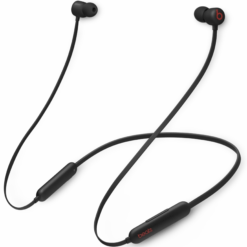
Beats Flex All Day Wireless Earphones Beats Black

Beats Flex All Day Wireless Earphones Beats Black

₹3,000
Buy now
Ant Esports H1100 Pro RGB Wired Over Ear Gaming Headphones with Mic for PC Carbon Black

Ant Esports H1100 Pro RGB Wired Gaming Headphones with Mic

₹1,000
Buy now
Refurbished Apple AirPods Pro with Wireless Charging Case – Noise Cancelling Earbuds

Apple Airpods Pro With Wireless Charging Case Active noise cancellation enabled Bluetooth Headset (Pearl White, True Wireless)

₹10,000
Buy now
Gadxy

GADXY began with a simple idea: no more waiting at the repair shop. We fix phones at your door, buy the ones you’re done with and give them a second life

Call77700 06737 WhatsAppChat with us Emailcare@gadxy.com
Services
  • Book a repair
  • iPhone repair
  • Sell your phone
  • Pre-owned phones
  • Accessories
  • Check your warranty
  • My account
Cities
  • Kolkata
  • Hyderabad
  • Jamshedpur
Company
  • About Gadxy
  • For companies
  • Partner with us
  • Blog
  • Contact us
  • Kolkata service centre
Policies
  • Warranty policy
  • Shipping & delivery
  • Returns & refunds
  • Privacy policy
  • Terms of service

App shortcut

This website and app book doorstep phone repairs in Kolkata, Hyderabad and Jamshedpur. You can choose a repair, see the price and follow your booking. If you sign in with Google, we receive only your name, email address and profile picture, and use them to set up your account. We never sell your data or take anything else. Read our Privacy Policy.

All product names, logos and brands are property of their respective owners. They are used on this website for identification only and do not imply endorsement.

© 2026 Gadxy. All rights reserved.
Registered office: 2nd Floor, 8/1, Princep Street, Kolkata, West Bengal 700072

GADXY

Add Gadxy to Home Screen

  1. Tap menu icon › Sharemenu icon is bottom left
  2. Tap View More › Add to Home Screenscroll down in the list
  3. AddTap Add. Done!
  4. Older iPhone: tap the Share button, then Add to Home Screen.
  1. Tap ⋮ at the top of Chrome
  2. Tap Install app or Add to Home screen
  3. AddTap Install. Gadxy is on your Home screen.

Gadxy is already on this phone. Open it from the app icon on your Home Screen.

  • TRACK ORDER
  • MORE ABOUT US
    • Ship and Delivery
    • Warranty & FAQs
    • Contact
    • Terms of Service
    • Ratings
    • GADXY Privacy Policy
    • Return Refund Cancellation